How to Audit Your Shopify Search Performance

Written by Alok Patel
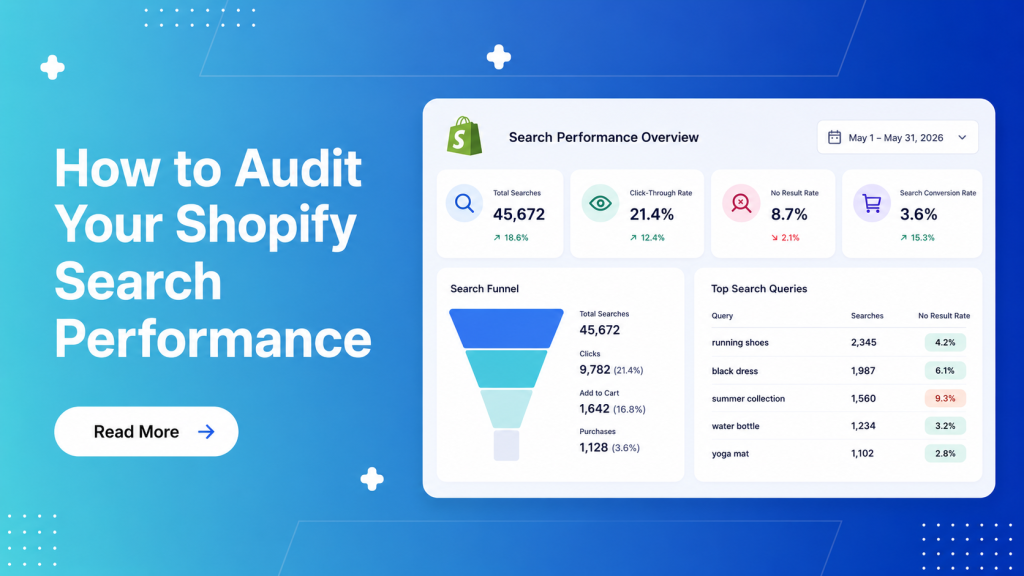
Shopify search performance is one of the clearest indicators of how easily shoppers can find products on your store. If search is weak, customers struggle to discover the right items, bounce faster, and convert less often. If search is strong, shoppers move more smoothly from intent to purchase.
A good search audit helps you identify where customers are getting stuck and what is costing you revenue. It shows you which queries are converting, which ones are failing, and which parts of your search experience need improvement. For growing Shopify brands, this is not just a technical task. It is a direct revenue optimization exercise.
Why Search Performance Matters
Search is one of the highest-intent behaviors in ecommerce. A shopper who uses search is often further along in the buying journey than a casual browser. They already have some idea of what they want, which means the store has a better chance of converting them if the right results appear quickly.
When search performance is poor, that buying intent gets wasted. Shoppers may type a product name, a category, a style, or a feature, and still see irrelevant results or no results at all. That creates friction, lowers confidence, and pushes people away from checkout.
This is why search audits matter so much. They help you understand whether your storefront is helping shoppers find products or quietly losing revenue.
What a Shopify Search Audit Should Cover
A useful audit goes beyond checking whether the search bar works. It should examine the full experience from query to click to purchase.
The main things to review are:
- Search usage volume.
- Top search terms.
- Zero-result searches.
- Low-click searches.
- Search-to-product click-through rate.
- Search-to-cart conversion.
- Search-to-purchase conversion.
- Filter usage after search.
- Mobile search behavior.
- Synonym and typo handling.
These signals show whether customers are finding relevant products or getting stuck in the discovery process. The goal is to identify the biggest leaks first, then improve the experience in the areas that matter most.
Start With Search Traffic
The first step in a search audit is to understand how often shoppers use search. If a large share of visitors rely on search, then its performance has an even bigger impact on revenue. If search is underused, that may signal poor discoverability elsewhere in the store.
Look at how many sessions involve search, which devices those sessions come from, and how search users behave compared with non-search users. In many stores, search users convert better than general browsers because they have stronger intent. That makes search even more important to get right.
You should also review whether search usage spikes on certain days, campaigns, or categories. Seasonal patterns can reveal where your search experience is underperforming under pressure.
Review Top Search Queries
Once you know how often search is used, look at what shoppers are actually typing. This is where the audit becomes more useful. Search queries reveal customer language, product demand, and gaps in product visibility.
Pay close attention to:
- Most common search terms.
- Queries with strong intent words like size, color, price, or category.
- Brand searches.
- Style-based searches.
- Misspellings and variations.
- Long-tail queries.
If shoppers repeatedly search for products you do sell, but those results are poor, that is a sign your search relevance needs work. If shoppers search for items you do not carry, that may indicate demand gaps or opportunities for product expansion.
Find Zero-Result Searches
Zero-result searches are one of the biggest red flags in a Shopify search audit. If customers type a query and get nothing back, they often leave immediately. That is a direct loss of revenue.
You should list the most frequent zero-result terms and rank them by search volume. Some will be obvious misspellings. Others may be synonyms, regional terms, or product names your catalog does not recognize.
For example, shoppers may search using slang, shorthand, or category language that does not match your internal product naming. If your store sells the item but search cannot connect the dots, the problem is not demand. It is relevance.
The fix usually involves better synonyms, typo tolerance, product tagging, and fallback results that still guide shoppers toward useful products.
Check Low-Click Searches
Not every search with results is successful. Some queries return products, but shoppers do not click anything. These are low-click searches, and they are just as important as zero-result searches.
Low-click searches usually point to one of three problems. The results are irrelevant. The products shown are unattractive or low quality. Or the results do not match shopper intent closely enough.
If a query gets many impressions but little engagement, it is worth investigating the ranking order, product images, titles, and available filters. Sometimes the right products exist, but they are buried too far down the page. Sometimes the title language is too technical or too generic. Sometimes the search engine is matching too loosely.
Measure Search-to-Purchase Conversion
Search performance should always be tied to business outcomes. Clicks matter, but revenue matters more. That is why a search audit should compare search users with the broader site population.
Look at:
- Add-to-cart rate from search sessions.
- Checkout completion rate from search sessions.
- Revenue per search session.
- Average order value from search traffic.
If search users convert much lower than expected, the issue may be relevance, filters, merchandising, or product page alignment. If search users convert well, then the challenge may be scaling that experience across more queries and categories.
The key is to use search as a revenue lens, not just a navigation metric.
Audit Mobile Search Separately
Mobile search behavior is different from desktop behavior. Shoppers are often faster, less patient, and more likely to make short or incomplete queries. They also depend more on autocomplete and cleaner result pages.
A mobile audit should check:
- Whether search is easy to find.
- Whether autocomplete is useful.
- Whether search results load quickly.
- Whether filters are easy to use.
- Whether result pages are readable on smaller screens.
If your mobile search experience is poor, you may be losing the majority of your search revenue before shoppers ever reach a product page. In many stores, mobile is where the biggest friction appears first.
Review Synonyms and Typos
People do not always search using the exact language in your catalog. They may use abbreviations, slang, alternate spellings, or regional terms. If your store does not understand those variations, search performance will suffer.
A good audit should look for:
- Misspellings.
- Singular and plural differences.
- Brand abbreviations.
- Regional language variations.
- Category synonyms.
- Style-based terms.
For example, a shopper may search for one term while your catalog uses another. If the system cannot connect them, relevant products will not appear. Improving synonym coverage is one of the fastest ways to improve search performance.
Look at Filters After Search
Search does not end when results appear. Shoppers often refine results using filters. If filters are weak, the search experience will still feel frustrating even if the initial query returns products.
Check which filters shoppers use after searching. Are they filtering by size, color, price, brand, or material? Are they abandoning after filtering? Are filters helping users reach products faster?
This is important because search and filters work together. A strong search audit should measure both. If the search engine is good but the filters are poor, customers may still struggle to find the right item.
Compare Search Performance by Category
Different categories often perform very differently. Fashion may have more style ambiguity. Electronics may rely more on technical terms. Beauty may depend on shade and ingredient language. Home products may need more dimensions and use-case filtering.
Your audit should break search performance down by category. This helps you see where problems are concentrated. If one category has high zero-result rates or weak click-through, it may need more attention than the others.
Category analysis also helps you understand where product data quality is hurting discovery. Some categories may simply need better tagging, better attributes, or more precise product names.
Turn Audit Findings Into Actions
A search audit is only useful if it leads to change. After you identify the biggest problems, prioritize fixes by impact and effort.
Typical high-value fixes include:
- Adding synonyms.
- Improving typo handling.
- Re-ranking bestsellers for broad terms.
- Cleaning up product titles and tags.
- Improving mobile autocomplete.
- Strengthening filters.
- Creating fallback results for zero-search queries.
Start with the queries and categories that drive the most traffic and revenue. Fixing the biggest leaks first will give you the fastest return.
A Simple Audit Checklist
Use this checklist to guide your Shopify search audit:
- Track how often shoppers use search.
- Review top queries and search terms.
- Identify zero-result searches.
- Identify low-click searches.
- Compare search conversion to store-wide conversion.
- Audit mobile search separately.
- Review synonym and typo coverage.
- Check filter behavior after search.
- Compare performance by category.
- Prioritize fixes by revenue impact.
If you run through this process regularly, your search experience will improve over time instead of slowly degrading.
Final Thoughts
Shopify search performance is one of the easiest places to uncover hidden revenue opportunities. A small improvement in relevance, filters, or query handling can have a big effect on conversion because search users already have strong intent.
A proper audit shows you where shoppers struggle, what they are really looking for, and which parts of the experience are costing you sales. Once you identify those gaps, you can fix them with a clear plan rather than guessing.
For growing Shopify brands, search is not just a utility. It is a revenue channel. Auditing it regularly is one of the smartest ways to improve product discovery and increase sales.
Share this article
Help others discover this content