How to Use Filters to Reduce Product Discovery Friction
Product discovery friction is one of the biggest hidden reasons shoppers leave an ecommerce store without buying. When people cannot quickly narrow down products, they get overwhelmed, lose confidence, and abandon the journey. Filters solve this problem by helping shoppers move from “too many option
Product discovery friction is one of the biggest hidden reasons shoppers leave an ecommerce store without buying. When people cannot quickly narrow down products, they get overwhelmed, lose confidence, and abandon the journey. Filters solve this problem by helping shoppers move from “too many options” to “the right options” in fewer steps.
For Shopify stores and other ecommerce brands, filters are not just a navigation feature. They are a conversion tool. When filters are designed well, they make the store easier to explore, improve relevance, and help shoppers reach a decision faster.
What Product Discovery Friction Looks Like
Product discovery friction happens when shoppers have to work too hard to find something they want. It shows up in many ways:
- They see too many products at once.
- The filter options are confusing or irrelevant.
- Important filters are buried too deep.
- Mobile filters are hard to tap or too slow.
- Search results are broad, but filtering does not help enough.
This friction increases bounce rates and lowers conversion. A shopper may already have buying intent, but if the store makes the search process feel slow or confusing, the sale is lost.
Why Filters Matter So Much
Filters help shoppers reduce a large catalog into a manageable set of products. Instead of scrolling endlessly, they can narrow results based on what matters most to them.
That matters especially in categories like fashion, beauty, electronics, furniture, and grocery, where catalogs are large and shopper intent is often specific. A user may know they want a black dress under a certain price, a laptop with 16GB RAM, or a sofa with a certain fabric and size. Filters make those choices easier.
The best filters do more than organize products. They guide decision-making.
Start With Category-Specific Filters
One of the fastest ways to reduce friction is to make filters relevant to the category.
A one-size-fits-all filter setup creates confusion. The attributes that matter for shoes are not the same as the ones that matter for headphones or home décor. That is why each category should have its own filter logic.
For example:
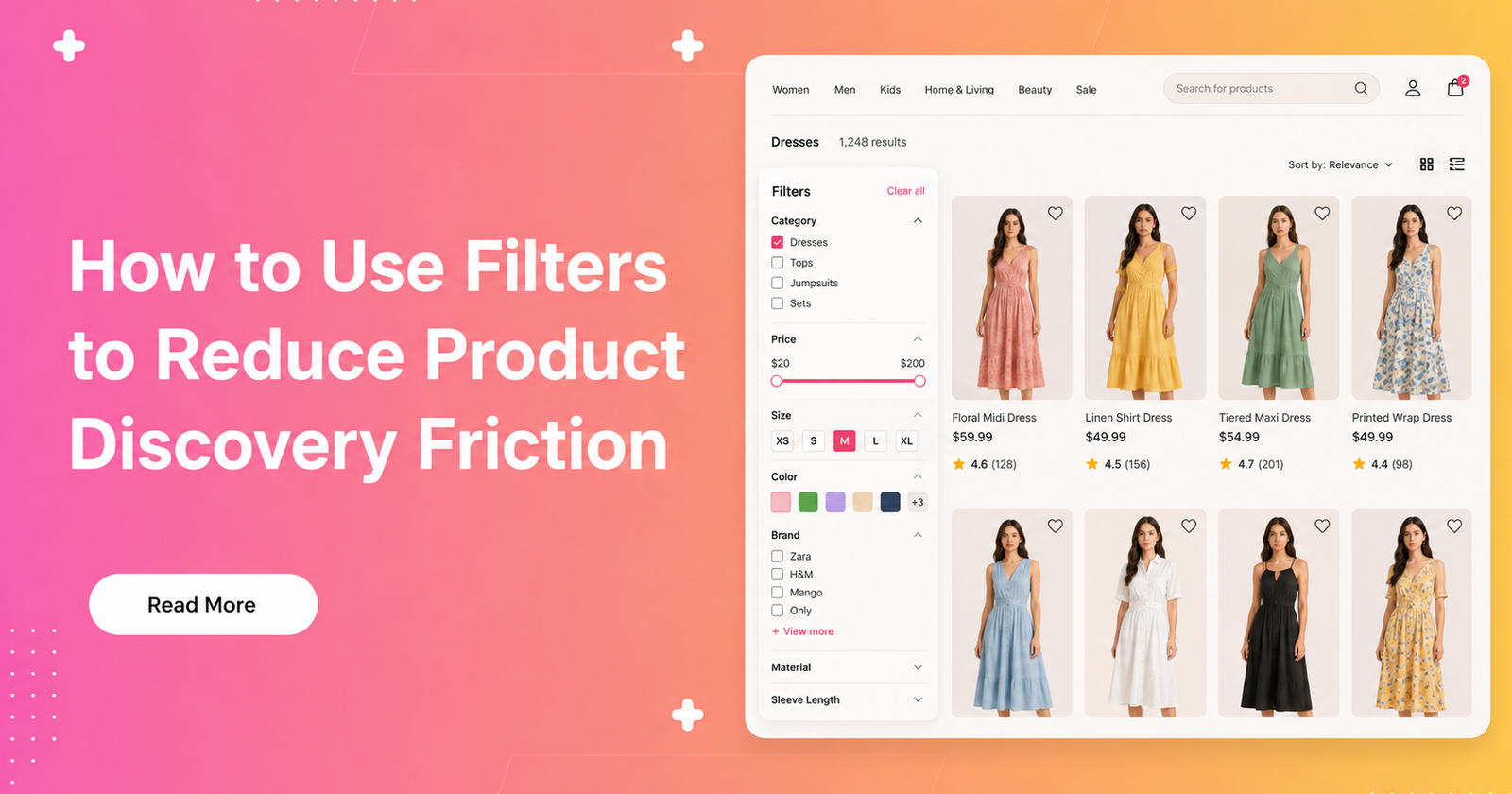
- Fashion: size, color, fit, fabric, sleeve length, occasion, brand.
- Electronics: brand, price, screen size, storage, battery life, compatibility.
- Home décor: material, dimensions, room type, color, style.
- Beauty: shade, skin type, concern, ingredient type, finish.
When shoppers see filters that match their intent, they can act faster. They do not waste time scanning irrelevant options.
Put the Most Useful Filters First
The order of filters matters more than most stores realize. If the most useful filters are buried too far down, shoppers spend more time searching for them.
A good filter system puts the highest-impact filters first. These are usually the ones that directly affect purchase decisions. For fashion, that may be size and color. For electronics, it may be price and brand. For furniture, it may be size and material.
The goal is simple: reduce the number of steps between a shopper’s intent and the product they want. If a user can see the right filter immediately, they move faster and feel less friction.
Use Clear, Human Language
A filter only works if people understand it. If labels are too technical, too internal, or too vague, shoppers hesitate.
Use plain language that sounds natural to the customer. Instead of hidden backend terms or product-data jargon, use filter names people already know. For example, “Material” is easier to understand than a technical attribute label. “Sleeve length” is more useful than a coded field name.
This also helps with confidence. When people understand the filters, they trust the results more.
Make Multi-Select Easy
Many shoppers do not want just one filter. They want several. They may want black or beige, a specific size, under a price range, and available for quick delivery.
If the store forces them to filter one step at a time and restart repeatedly, friction rises. A better experience lets shoppers combine filters smoothly and see results update quickly.
Multi-select filtering is especially important in high-consideration categories. Shoppers are often trying to rule out bad options, not just find one perfect match. The easier it is to combine preferences, the easier it is to buy.
Reduce Clutter in the Filter Panel
Too many filters can create the same problem as too few. If the panel is crowded and visually noisy, shoppers get tired before they even start filtering.
Keep the interface focused. Show the most important filters first. Group similar filters together. Hide less important ones behind expandable sections if needed. Avoid repeating similar options.
A clean filter layout helps people feel in control. It reduces the mental effort required to shop and makes the page feel easier to use.
Make Filters Work Well on Mobile
Mobile shopping is where friction becomes very obvious. Small screens leave less room for long lists, and tapping through multiple filters can be frustrating.
On mobile, filters should be fast, simple, and easy to close and reopen. The most important options should be visible quickly. Tap targets should be large enough to use comfortably. The experience should feel lightweight, not cumbersome.
If mobile filters are hard to use, shoppers will abandon the page even if the products are good. This is one of the most common reasons stores lose revenue.
Use AI to Surface Better Filters
AI can make filters much smarter by adjusting them based on context. Instead of showing the same filter set to every shopper, the system can highlight the filters that are most useful for that session.
For example, if someone searches for “wedding guest dress,” the filter priorities should shift toward occasion, color, fabric, and price. If someone searches for “gaming laptop,” the filters should focus on specs like processor, RAM, and storage.
AI also helps by learning from shopper behavior over time. If users in a category always use a certain filter first, that filter can be moved up. If a filter is rarely used, it can be deprioritized. This makes the experience more intuitive and less cluttered.
Align Filters With Search Intent
Filters should not feel disconnected from search. Search helps shoppers express what they want. Filters help them narrow it down.
If a shopper searches for “running shoes,” the filters should reflect the kinds of choices that matter in that category. If someone searches for “office chair for back pain,” the filter set should prioritize support, adjustability, material, and price.
When search and filters work together, the shopping journey feels much smoother. The shopper does not need to think about how the catalog is organized. The store guides them naturally.
Track What Shoppers Actually Use
To improve filters, you need to know which ones shoppers use and which ones they ignore.
Useful metrics include:
- Filter usage rate.
- Click-through rate after applying filters.
- Add-to-cart rate from filtered sessions.
- Conversion rate from filtered sessions.
- Abandonment after filtering.
- Zero-result rate.
These metrics show where friction still exists. If people apply filters but do not click products, the results may not be relevant enough. If they never use certain filters, those filters may be unnecessary or poorly placed.
Analytics turn filter design from guesswork into a real optimization process.
Improve Filter Data Quality
Good filters depend on good product data. If products are missing attributes, the filter experience will always be incomplete.
For example, if size, color, material, or compatibility data is missing, the shopper cannot narrow results properly. That creates frustration and lowers trust. Poor data also makes AI-driven filtering less effective.
This is why product enrichment matters. The more complete and consistent the catalog data is, the better the filters can perform.
Best Practices for Lower Friction
Here is a practical checklist for reducing product discovery friction with filters:
- Use category-specific filter sets.
- Put the most important filters first.
- Keep labels simple and clear.
- Support multi-select filtering.
- Make filters mobile-friendly.
- Reduce clutter and overlap.
- Use AI to adapt filter priorities.
- Track filter engagement and abandonment.
- Improve product data quality.
- Keep filtering fast and responsive.
These steps may seem small individually, but together they create a much smoother shopping journey.
Final Thoughts
Filters are one of the most powerful tools in ecommerce product discovery. When shoppers can quickly narrow down products without confusion, the entire buying experience improves.
The key is to make filters relevant, simple, visible, and fast. Add AI where it improves context and personalization. Keep the structure category-specific. Remove clutter. Make mobile easy. And always use real shopper data to refine the experience.
When filters reduce friction, they do more than help navigation. They help conversion.